
Post New Topic

PhotoShop Tutorial - B&W with a Touch of Color
HamptonsBride Posted:

PhotoShop Tutorial - B&W with a Touch of Color
Well since many of you have your wedding pics and may be playing around with Photoshop...i figured i'd share how to do those B&W pics with a touch of color...since asked by a fellow bride...who did a freakin' phenominal job just following my written instructions (yeahh Peggie!)
Here ya go...

INSTRUCTIONS:
Open the image you want to work with & save 2 copies of it...one in RGB color (go under IMAGE...then MODE)

Take the second copy, open it and turn it into GREYSCALE..(again..go under go under IMAGE...then MODE and YES to disregard color)...then after it turns B&W...go under the color mode again & save it back as RGC...it will still be B& W but you can now drop it into your color verion of the pic)

Go into the B& W version and go to SELECT and choose ALL...then copy...and paste it onto the color version of your pic. So now you will have 2 layers in your file..the top layer will be your B&W version..the bottom your color one.

The theory is to “erase” the parts of the B&W version so that the color below can show thru. Now go to the bottom of your Layers window (if you don’t see the window go under WINDOW..then choose LAYERS and it will pop up)

Select the LAYER MASK tool...it looks like a grey horizontal rectangle with a white circle in it. After clicking it...select the BRUSH tool out of your tool box...(and make sure you have default colors of black & white selected in your tool box as well.) With Black selected for the brush color...click on the photo where you want to bring color up from the background...you will see it come thru. Continue using the brush to “paint away” the B&W and let the color come thru. And if you mess up...just select white in your tool box...then take the brush & paint over that area, and it will bring the B&W version back.

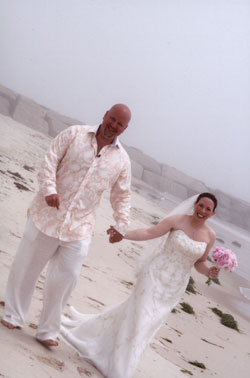
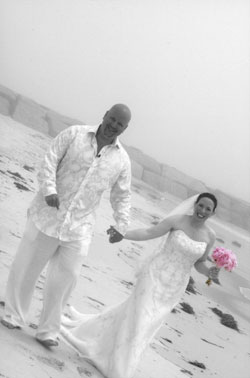
Here is the 'before & after'...happy PhotoShopping!

TnOiOnL Posted:

Re: PhotoShop Tutorial - B&W with a Touch of Color

innnteresting Kath! Theres obviously 1500 ways to do this- I never thought of making 2 layers like that though!

HamptonsBride Posted:

Re: PhotoShop Tutorial - B&W with a Touch of Color


Posted by MrsBartonToBe

innnteresting Kath! Theres obviously 1500 ways to do this- I never thought of making 2 layers like that though!


Oh i am sure there are...i tried to figure the quickest & one that you could 'correct' if you erased too much...if you have a better way...please share!!!!!
TnOiOnL Posted:

Re: PhotoShop Tutorial - B&W with a Touch of Color

I typically use the layer masking tool as well, but never thought of making 2 layers! I just mask out what I dont want and call it a day
When I show people how to do it though, I usually show them the color modes and have them just paint over it in black. 1 click/setting, but alot more time consuming
HamptonsBride Posted:

Re: PhotoShop Tutorial - B&W with a Touch of Color

ooohh...you just gave me another method!! woohoo...no one ever taught me...i just used the way i thought would work..haha...we hardly had computers when i was back in school! hahaha

TnOiOnL Posted:

Re: PhotoShop Tutorial - B&W with a Touch of Color

yea theres a million ways! I know of atleast 5! just kinda learned it on my own..
believe it or not, while I was in school PAYING to learn this stuff, DH taught me how to do the mask! ps- he was never in art school..
acsm Posted:

Re: PhotoShop Tutorial - B&W with a Touch of Color

thanks girls for sharing!!

ellebelle1 Posted:

Re: PhotoShop Tutorial - B&W with a Touch of Color

What photoshop do you need to do this?

HamptonsBride Posted:

Re: PhotoShop Tutorial - B&W with a Touch of Color


Posted by ellebelle1

What photoshop do you need to do this?


I have PhotoShop CS...the latest version is CS3....i am not sure if the Elements version has some of the features listed in the directions...HTH!
AllJoy Posted:

Re: PhotoShop Tutorial - B&W with a Touch of Color

Great job Kath! Can you give a class on photoshop. I need the one for dummies.

NowAndForever2012 Posted:

Re: PhotoShop Tutorial - B&W with a Touch of Color

Thank you I am going to try this..........

mandc722 Posted:

Re: PhotoShop Tutorial - B&W with a Touch of Color

THANK YOU!!!

vintagegirl Posted:

Re: PhotoShop Tutorial - B&W with a Touch of Color

download Picasa its alot easier than photoshop .. plus your photos won't come out looking flat if you don't know how to fix levels in phtoshop..

PegaLega Posted:

Re: PhotoShop Tutorial - B&W with a Touch of Color

Piece o cake! So easy to follow and now cant stop doing it!

Thanks
Brian and Marie Posted:

Re: PhotoShop Tutorial - B&W with a Touch of Color

Thanks!

Reply to this topic

Log in to reply or quote a post.