
Post New Topic

HELP PLEASE! DIY Laser Printing on Envelopes
CC11208 Posted:

HELP PLEASE! DIY Laser Printing on Envelopes

Any computer/printer wizards on LIW tonight?

I'm great with layout and graphic design, just can't get my envelopes to print without problems!

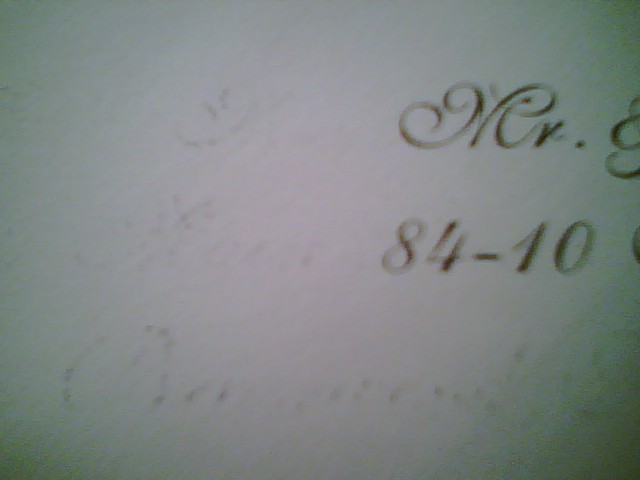
I'm using the MS Word Envelope Wizard and I've been able to print on plain letter-sized envelopes ok, but when I put in our outer envelopes, there's a faint 'imprint' smudging of the address text on the left side of the address. In other words, it looks like this:

Mr. Mr. & Mrs. Xxxxxxx
Str Street Address Line 1
City City, State, Zip Code

I hope this makes sense..... the letters on the far left are faint, but make the envelope look dirty, and you can make out the letter shapes. Then the name & address on the right are sort of smudged, not outward from the letter outlines, but as if some of the ink had been lifted off of each letter. The envelopes are plain and smooth, not textured, so I don't know why this is happening.

If it weren't for this faint imprint, the envelope would be perfect. I doubt it's the envelope's thickness, because I printed an inner envelope with the same exact thickness and it prints perfectly.... in fact, I was proud that I got this to work so far!

I'm using a Mac Powerbook G4, MS Word, and an HP Color LaserJet 2605dn. I'm feeding each envelope into the printer one-by-one through the paperfeed in the front of the printer (Tray 1).

Anybody have this problem? Any ideas on how to fix it?

Thanks in advance for your help!
KC2008 Posted:

Re: HELP PLEASE! DIY Laser Printing on Envelopes

Try cleaning out the printer?

lucamon Posted:

Re: HELP PLEASE! DIY Laser Printing on Envelopes

I have the same problem with my laser printer. you have to adjust the settings when you print. What kind of paper are the envelopes? Is it glossy with a wax on it. Try changing the settings to semi gloss paper or even cardstock. HTH

lucamon Posted:

Re: HELP PLEASE! DIY Laser Printing on Envelopes

I just read the rest of your post... I have the EXACT same printer.
CC11208 Posted:

Re: HELP PLEASE! DIY Laser Printing on Envelopes


Posted by KC2008

Try cleaning out the printer?


Thank you for replying. The printer is brand new, only used it a few times, but I did try cleaning it out too.
lucamon Posted:

Re: HELP PLEASE! DIY Laser Printing on Envelopes

Did you try changing the settings to cardstock? Envelopes are usually heavier paper, especially if its folded.

CC11208 Posted:

Re: HELP PLEASE! DIY Laser Printing on Envelopes


Posted by lucamon

I have the same problem with my laser printer. you have to adjust the settings when you print. What kind of paper are the envelopes? Is it glossy with a wax on it. Try changing the settings to semi gloss paper or even cardstock. HTH


That's funny that we have the same printer! The envelopes are a smooth paper, not textured, not glossy or waxed at all. They're a bit thicker than regular computer paper, but not as thick as cardstock, although I guess since there's 2 layers because they're folded into the envelope shape, it makes it thicker like cardstock.

One question... how do you change the settings? Is it on the computer or on the printer's digital readout itself? I've only had the printer a few months, but this is the first time I'm really using it. Still learning how it works, and the printed materal that came with the printer is really no help. Thanks for any help you can provide!!
lucamon Posted:

Re: HELP PLEASE! DIY Laser Printing on Envelopes

You can either do it through the control panel or change it while in the print setting.

When you hit print, it will tell you the 'Currently selected paper' is. If that's not what you want go to printing preferences and select another type of paper. There is actually an option for 'Envelope'.
lucamon Posted:

Re: HELP PLEASE! DIY Laser Printing on Envelopes

I hope this makes sense. I don't have a Mac.

CC11208 Posted:

Re: HELP PLEASE! DIY Laser Printing on Envelopes


Posted by lucamon

I hope this makes sense. I don't have a Mac.


Actually, it does! I just found this... when I hit 'print' on my computer, a box pops up to ask what details I want in printing. Under 'Presets' I'm used to it saying 'Copies & Pages.' I scrolled down that menu and found 'Finishing.' A scroll-down menu comes up that says 'Media Type.' Under that menu, I found all types of paper, including cardstock, glossy, transparency, envelope, and heavy envelope. I didn't even know I had this feature available!

I'm going to try cardstock & heavy envelope and see what happens.

Thanks so much for your help!!
lucamon Posted:

Re: HELP PLEASE! DIY Laser Printing on Envelopes

Good luck and let me know how it goes.
Let me know if you run into trouble with the double sided function. This printer doesn't like to print double sided on paper over 105 lbs. It makes a really scary noise.
CC11208 Posted:

Re: HELP PLEASE! DIY Laser Printing on Envelopes

OK, so I'm replying to my own question, but maybe this will help someone else with the same problem.

I changed the settings to 'Heavy Envelope' and just printed a perfect envelope with absolutely no smudging at all! It worked!!

Lucamon, thanks for the tip about the settings. I just read the thread about your dress. I'm so sorry that happened to you!! I hope it works out!!
lucamon Posted:

Re: HELP PLEASE! DIY Laser Printing on Envelopes


Posted by CC11208

OK, so I'm replying to my own question, but maybe this will help someone else with the same problem.

I changed the settings to 'Heavy Envelope' and just printed a perfect envelope with absolutely no smudging at all! It worked!!

Lucamon, thanks for the tip about the settings. I just read the thread about your dress. I'm so sorry that happened to you!! I hope it works out!!


No problem!
Thanks, I feel much better about it with all the replies from other brides.

Reply to this topic

Log in to reply or quote a post.