My pics are all too big to put on here, i think thats my problem! Does anyone know how to downsize?
DavaDay
Posted:
Member since
Re: How do you shrink pics
Easiest thing to do is to upload them to your photo album (either here on LIW or photobucket or wherever you have an account).
Then, you get the web address for that pic online, start a message, and click on 'Insert Web Image' on the left side of the screen. Insert the web address of the pic, and - voila!
DavaDay
Posted:
Member since
Re: How do you shrink pics
Like, here, I'll post one of the pics of flowers from your own online album. I went to the photo in your album. I right-clicked on the photo and, because I have a Mac, clicked on 'Copy Image Address'. On a PC I think you go to 'Properties' and find the address there. It's http://www.liweddings.com/mywedding/album/i/242408.jpg. Then I clicked on 'Insert web image, copied that address into the box, yadda yadda... here you go:
hannahshim
Posted:
Member since
Re: How do you shrink pics
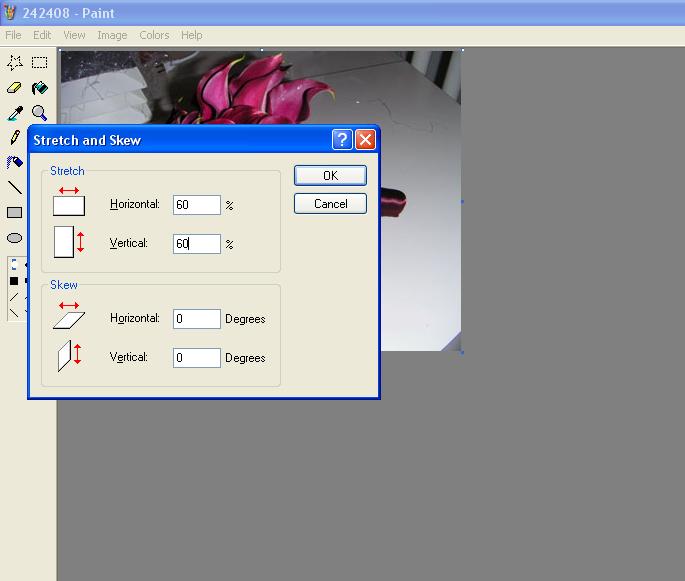
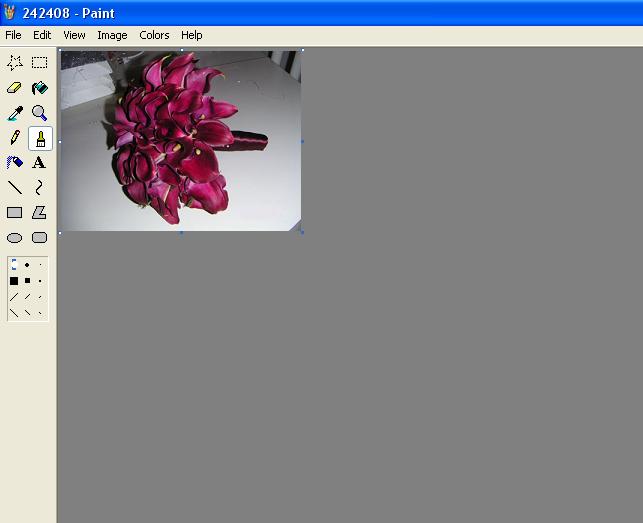
open it with paint and press ctrl+W
and input the percentage you want to shrink it to.
hannahshim
Posted:
Member since
Re: How do you shrink pics
for example.. if you wanted to shrink that Bok pic you would open it in paint press ctrl & W at the same time and put in the percentage and press ok~
and input the percentage you want to shrink it to.
that's what i do, and then i make sure its in jpg format and less than 58 in size... it says 60 but usually anything over 58 is too big, and i attach it as an attachment
DavaDay
Posted:
Member since
Re: How do you shrink pics
Oh you Microsoft show-offs!
I'm on a Mac and don't have Paint so I do it the long way.