Post New Topic

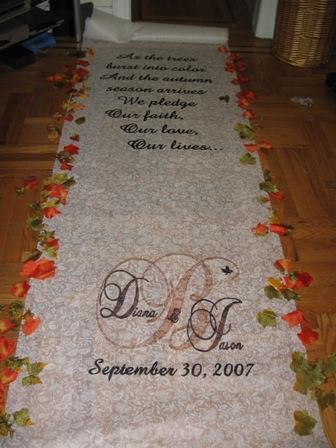
How To Make an Aisle Runner

qtdimps23 Posted:

How To Make an Aisle Runner

A few people have asked how I made it, so here it goes:

1. Figure out what you want it to say.
2. Open Microsoft Publisher and make the page size custom, 3'x4'.
3. Add what you want (if it's a poem, make the size 300 and choose the font you want)
4. when you're ready to print, go to print preview. change the overlap to 0.
5. It will print on many sheets
6. Tape the papers together
7. with a pencil, trace together the pages (during printing writing gets cut off)
8. tape the paper to the floor
9. roll the runner on top of it and tape the runner down...make sure it's straight
10. with a very thin marker trace the poem/monogram
11. with a thick marker, fill in the words/monogram that you just traced with whatever color you want

MAKE SURE YOU PUT SOMETHING UNDERNEATH...IT RUNS!!!

Hope this helps!
JennyJim Posted:

Re: How To Make an Aisle Runner

thanks... i plan on making mine next week
btw- yours looks great!
Tobewed07 Posted:

Re: How To Make an Aisle Runner

Thanks sweetie!! I am going attempt to make one over the summer!!

Madorie Posted:

Re: How To Make an Aisle Runner

Any particular type of marker? That runner is so nice!

RGV07 Posted:

Re: How To Make an Aisle Runner

can you use another program? i dont have publisher, just word.

Reply to this topic

Log in to reply or quote a post.