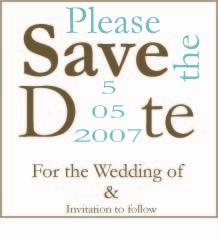
nice...how do you make it? where do you get the magnet paper?
lilred13
Posted:
Member since
Re: my save the date
great job very creative!
FDWedding07
Posted:
Member since
Re: my save the date
Very Nice!!
zenergy47
Posted:
Member since
Re: my save the date
thanks :) office depot has the magnet paper
June12007bride
Posted:
Member since
Re: my save the date
To make this design follow the instructionsfor monograms in microsoft word below :
To design your monogram in Microsoft Word: Choose Insert -> Textbox. Type and format the letter the way you like it. Do this three times. Now click on all textboxes and choose Format->Textbox. Choose Color: No Fill (so you can overlap letters) and Line: No Line. Select all letters, right click, and choose Group to lock in the arrangement. You can now copy your image into Microsoft Paint and save in several formats, such as JPEG.
And to get the words vertical :
You can change the text orientation in drawing objects, such as text boxes (text box: A movable, resizable container for text or graphics. Use text boxes to position several blocks of text on a page or to give text a different orientation from other text in the document.), shapes, and callouts, or in table (table: One or more rows of cells commonly used to display numbers and other items for quick reference and analysis. Items in a table are organized into rows and columns.) cells so that the text is displayed vertically or horizontally.
Click the drawing object or table cell (cell: A box formed by the intersection of a row and column in a worksheet or a table, in which you enter information.) that contains the text you want to change. On the Format menu, click Text Direction. Click the orientation you want.
chrissyandvin
Posted:
Member since
Re: my save the date
very nice!! Good job!
sugarkube4
Posted:
Member since
Re: my save the date
They are adorable.. good job!!!!
JazzyT
Posted:
Member since
Re: my save the date
I think its cute
camerakrazie
Posted:
Member since
Re: my save the date
Posted by zenergy47
thanks :) office depot has the magnet paper
oh ok great...thanks!!!
Nina
Posted:
Member since
Re: my save the date
Very nice
lisaslove
Posted:
Member since
Re: my save the date
those are nice
zenergy47
Posted:
Member since
Re: my save the date
If any of you have access to Illustrator program -that is where i created it, FM and i can send you the file and you can make your own revisions!!
enjoy!!
brittny817
Posted:
Member since
Re: my save the date
Gorgeous! Very nice job
chander618
Posted:
Member since
Re: my save the date
i like
lilqtpie2181
Posted:
Member since
Re: my save the date
very cute!! i liek that they are different! Good work!