Post New Topic

table number previews

zoe282 Posted:

table number previews

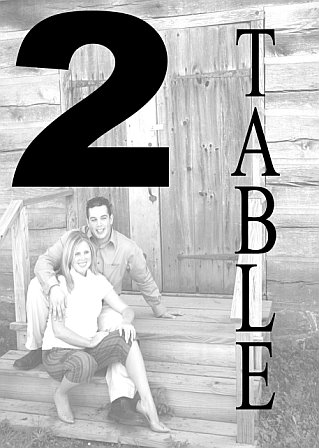
Thanks to someone on here I was able to start to make my table numbers in powerpoint! The instructions were great! I am very excited and can't wait till they are printed!

Kittyg19 Posted:

Re: table number previews

I love them!!! They are great and such a nice personal touch. one month before my wedding I may ask you how to do that!!! what kind of frames are you putting them in?
stacey23 Posted:

Re: table number previews

that looks great, i really really like it
SB7308 Posted:

Re: table number previews

They came out great!!!!

roan126 Posted:

Re: table number previews

They look great!!

RadiantBride Posted:

Re: table number previews

Congrats! They look great
bonch20 Posted:

Re: table number previews

so cute!!

Browneyesncute Posted:

Re: table number previews

they look great! where can i get the instructions from??

RisiLeigh Posted:

Re: table number previews

Yay Zoe they came out AMAZING!!! I can't wait to do mine!!!!!!!!!!!!!!!!!!!!!!!!!!!!
RisiLeigh Posted:

Re: table number previews


Posted by Browneyesncute

they look great! where can i get the instructions from??


Ok, I opened Powerpoint.
- New document
- File, Page Setup
- Changed the page size to 20 x 28 inches (**this is 4 times the 5x7 size they will actually be printed as - this is so that the quality remains as high as possible when I save it as a jpg file**)
- Click OK
- Then Insert Image you want to use
- Double click image (brings up Format Picture window)
- In the 'Size' tab, changed the height to 20 inches
*VERY IMPORTANT: Make sure the 'Lock Aspect Ratio' box IS CHECKED*
- Now the picture fits perfectly up and down, but may be too big horizontally.
- Crop the left or right (or both) side until it's 28 inches.
- Now the image is the same size as your Page Setup.

To make the image lighter:
- Double click image
(Format Picture window opens)
- In the 'Picture' tab, click on the arrow for 'Color'
- Choose 'Washout'
- Click OK
- IF the image is too light, go back into Format Picture and INCREASE the Contrast by 10 and DECREASE the brightness by 10.

To add text:
- Insert WordArt
- Play with fonts, colors, and size to achieve the look you want for the wording.

ETA: Ok so I forgot to add the last step - how to save the file as a picture.

When you are done with making the file (and as you are working on it), save your file.

Once you're finished and happy with the way the picture looks, you need to save it as a jpg file. To do this, go to File, Save As, and in the 'File Type' change it to 'JPG' and save it again as a jpg. It's going to ask you to save all slides or just the current slide - if you click to save all files, it will save each slide that you have in the file as a jpg - each file will be automatically saved in a new folder.

So now you have the files saved as individual jpg files. What I plan to do is to upload the jpg files to Kodak Gallery or Shutterfly and to order 5x7 prints of each - that way I'll have actual pictures and don't have to worry about buying photopaper and printing them myself. But I'm sure you could do that if you want.


GOOD LUCK!!!!!!!!!!!!!!

Lori-Chris2008 Posted:

Re: table number previews

I cant wait to do this!!! Yours came out soooooo nice..

We are going to use the e-shoot as well..!!!
zoe282 Posted:

Re: table number previews


Posted by Kittyg19

I love them!!! They are great and such a nice personal touch. one month before my wedding I may ask you how to do that!!! what kind of frames are you putting them in?


My color is pink and i found at the $1 store 5x7 pink frames so I am going to put them in there. You can definitely ask for the directoins i got them from somone!
zoe282 Posted:

Re: table number previews


Posted by RisiLeigh

Yay Zoe they came out AMAZING!!! I can't wait to do mine!!!!!!!!!!!!!!!!!!!!!!!!!!!!


thank you so muhc!!!! The directions were amazing!! I wasn't sure if i would be able to do them but I did!!!!
oktom22 Posted:

Re: table number previews

Thanks for the instructions on doing this!! It will keep me busy next month
FinallyEngaged Posted:

Re: table number previews

They came out awsome!
jessnstu08 Posted:

Re: table number previews

wow that looks great!

MrsMorgan Posted:

Re: table number previews

very nice!

Heather101208 Posted:

Re: table number previews

These are so fantastic that I was inspired to do all of mine! Thank you!

zoe282 Posted:

Re: table number previews


Posted by Heather101208

These are so fantastic that I was inspired to do all of mine! Thank you!


Wow who knew i'd be inspirational!!!!

Reply to this topic

Log in to reply or quote a post.