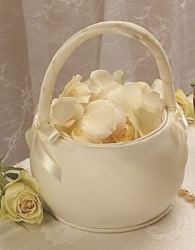
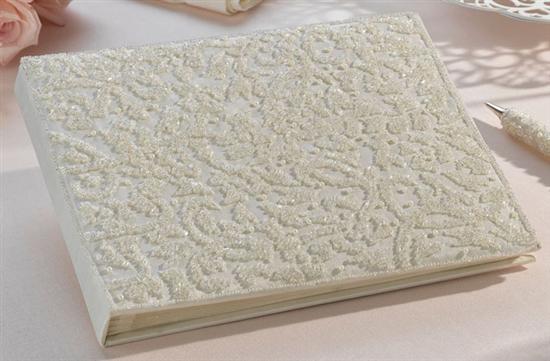
this is going to be my guest book and flower girl baskets??? what do you think??
mishjohn
Posted:
Member since
Re: take a look/??
Posted by mishjohn
Posted by mishjohn
this is going to be my guest book and flower girl baskets??? what do you think??
ok, let me try again??
ZKAT22
Posted:
Member since
Re: take a look/??
i can only see the flower girl basket...it's really cute. i can only imagine how pretty the guest book is
mishjohn
Posted:
Member since
Re: take a look/??
let's try this again!!
it's in my album~the gurst book under wedding stuff!
catsgirl
Posted:
Member since
Re: take a look/??
very nice,
debismom
Posted:
Member since
Re: take a look/??
mishjohn
Posted:
Member since
Re: take a look/??
Posted by debismom
thanks, how'd you do that??? but, don't you love it, it's also a photo album, it doub;es as 2 keepsakes!!
kimandvin
Posted:
Member since
Re: take a look/??
very pretty
debismom
Posted:
Member since
Re: take a look/??
Hope you don't mind Michelle!! I'm like a little kid, wanting to help!!! There's an easier way than resizing. 1. Click on the pic in your album, to make it the larger size. 2. Right click on the large pic, and choose Properties. 3. A box will come up with the Address/URL 4. Right click on that Address line, and then choose Select All; This will highlight the Address 5. Right click on the address again, this time, choosing Copy. 6. x out of the box 7. come to your reply page, and click on Insert Web Image, under the emoticons 8. A popup will appear at the top, to click to allow scripted windows, then click on Temporarily allow. 9. Click on Insert Web Image Again; This will bring up another box at the top, to paste the URL address, you just copied from your album. 10. Then, click ok, after pasting the URL address in that box. It should appear in the reply box. You can click on the preview box below, to make sure it copied.
I'll be happy to help you more with this if it still is not clear. It helps to open two LIW sites, at the same time, so you can do the first steps, then click on the site with the reply page. Mary MOB
mrsblesie2b
Posted:
Member since
Re: take a look/??
pretty!
mishjohn
Posted:
Member since
Re: take a look/??
Posted by debismom
Hope you don't mind Michelle!! I'm like a little kid, wanting to help!!! There's an easier way than resizing. 1. Click on the pic in your album, to make it the larger size. 2. Right click on the large pic, and choose Properties. 3. A box will come up with the Address/URL 4. Right click on that Address line, and then choose Select All; This will highlight the Address 5. Right click on the address again, this time, choosing Copy. 6. x out of the box 7. come to your reply page, and click on Insert Web Image, under the emoticons 8. A popup will appear at the top, to click to allow scripted windows, then click on Temporarily allow. 9. Click on Insert Web Image Again; This will bring up another box at the top, to paste the URL address, you just copied from your album. 10. Then, click ok, after pasting the URL address in that box. It should appear in the reply box. You can click on the preview box below, to make sure it copied.
I'll be happy to help you more with this if it still is not clear. It helps to open two LIW sites, at the same time, so you can do the first steps, then click on the site with the reply page. Mary MOB
thanks so much!!
debismom
Posted:
Member since
Re: take a look/??
Posted by mishjohn
Posted by debismom
Hope you don't mind Michelle!! I'm like a little kid, wanting to help!!! There's an easier way than resizing. 1. Click on the pic in your album, to make it the larger size. 2. Right click on the large pic, and choose Properties. 3. A box will come up with the Address/URL 4. Right click on that Address line, and then choose Select All; This will highlight the Address 5. Right click on the address again, this time, choosing Copy. 6. x out of the box 7. come to your reply page, and click on Insert Web Image, under the emoticons 8. A popup will appear at the top, to click to allow scripted windows, then click on Temporarily allow. 9. Click on Insert Web Image Again; This will bring up another box at the top, to paste the URL address, you just copied from your album. 10. Then, click ok, after pasting the URL address in that box. It should appear in the reply box. You can click on the preview box below, to make sure it copied.
I'll be happy to help you more with this if it still is not clear. It helps to open two LIW sites, at the same time, so you can do the first steps, then click on the site with the reply page. Mary MOB
thanks so much!!
You're welcome!!!!! Mary MOB
mnd1202
Posted:
Member since
Re: take a look/??
very pretty
queenbean
Posted:
Member since
Re: take a look/??
very nice!! I like both of them!
GinaZ
Posted:
Member since
Re: take a look/??
very cute and original!
eta: I love that the basket isn't a basket- it looks very sleek and elegant.