Post New Topic

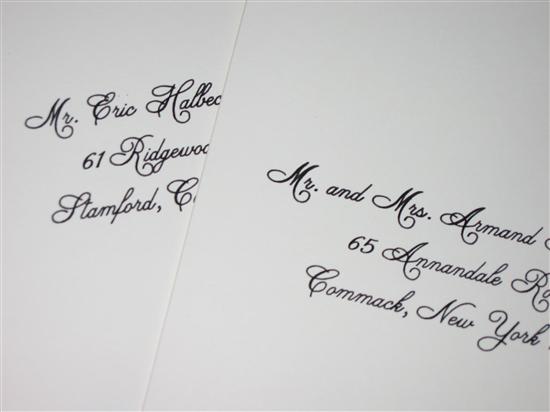
Computer Calligraphy

cherryj24 Posted:

Computer Calligraphy

Does anyone have any recommendations. Who did you use? how much? TIA


If my invites and returns are printed in burgundy the addresses should match right? Do they have to?
May2004 Posted:

Re: Computer Calligraphy

I did my own.

I downloaded a font and printed out my envelopes myself.
cherryj24 Posted:

Re: Computer Calligraphy

Really? Was is easy?? How did you do it? MS Word or something?

CaMacho Posted:

Re: Computer Calligraphy


Posted by May2004

I did my own.

I downloaded a font and printed out my envelopes myself.


We did this too. I forget the name of the font we used, but we printed them from Photoshop.
cindyandkevin Posted:

Re: Computer Calligraphy

We're going to be doing this on our own too. I think we're just going to use Monotype Corsiva, the basic script-like font in MS Word.

LaurenluvsTJ Posted:

Re: Computer Calligraphy

I had it done by the same place that did our invites... but we printed one one our own, and it came out just as good. If you have the time and patience, then thats a great way to do it.

ChrissynRicky Posted:

Re: Computer Calligraphy

Did our invites and envelopes in MS Word on our own...super easy!


JMC06 Posted:

Re: Computer Calligraphy

I used Just Announce it in Oceanside. They were awesome and very reasonable. They matched the font and color of my invitation wording exactly for the Addresses on the envelope; it was all done by their computer calligraphy.

May2004 Posted:

Re: Computer Calligraphy


Posted by cherryj24

Really? Was is easy?? How did you do it? MS Word or something?


Yeah real easy.

Here's a LIW topic on fonts (some of these aren't free)http://www.liweddings.com/chat/topic.aspx?ID=89293


Now I remember, I looked at a lot of sites, but some of them were....

http://fontfile.com

http://www.fontfreak.com/

http://www.dafont.com/en/

So just go on these sites and take a look at what font you like best - that's what I did. And just so happened I found an identcial font that matched my invitations - it was called 'Beautiful'


INSTALLING A FONT

Note: you must have an unzipping utility installed on your computer to unzip the fonts you download. WinZip is the best: www.winzip.com


--------------------------------------------------------------------------------

1) Download the font you want to install to a folder on your computer.
2) Double-Click the downloaded font. This should open it in your default unzipping program.

3) 'Extract' the font to the following folder on your hard drive:
C:\windows\fonts ( this is the default folder for fonts on windows 95/98 )

4) Once you have extracted the font, navigate to the folder you just extracted it to. Click on this folder. Once all your fonts are displayed, you should see the new one you just installed. Double-Click the new font to 'activate it'.

5) Finally, open your program you want to use the font in and it will now be one of the font choices available.

SPECIAL NOTE: Some fonts that you download 'Are Not' the same 'Name' as the font you download. Make note of the font when you open it in WinZip or your unzipping program. For example, we may call the ZIP file 'okiefont.zip', while the actual font name may be 'dokieokie.ttf'. The .ttf name is what will appear in the program you use the font in.

-----------------------------------------------------------------
OK - that's right. Now you have to put those files into MS Word into the font folder - to retreive them when working in MS Word (when MS Word is open in the Format/Font option)

Here's some instructions:

How to install a font under Windows ?
Files are compressed in the Zip format. There is no problem under XP, but with older Windows versions you must install Winzip or equivalent to be able to open these files.

Quick explanation
Place the .ttf (ou .otf ou .fon) files in the Fonts folder.

Detailed explanation
Go to the place where you saved the font.


Double-click on the zip to open it.


Drag and drop the files with the .ttf, .otf ou .fon extension elsewhere from the zip window (hold down the CTRL key to select several at once).

If the extensions are not displayed, click the Tools menu of any folder > Folders Options > Display tab > uncheck the stupid 'Hide file extensions for known file types' item.


Place these files into the Fonts folder, usually C:\Windows\Fonts or C:\WINNT\Fonts
(can be reached as well by the Start Menu > Control Panel > Appearance and Themes > Fonts).

Note that with the internal unzip tool of XP (unlike Winzip), you cannot install a font by a simple drag and drop of the .ttf from the zip window to the Fonts window. You must first drag and drop it anywhere (for example on the desktop) then in the Fonts folder.

You can also go through : File > Install a new font... in the Fonts folder menu then browse the fonts, instead of drag and drop the fonts into the window. Although this method is laborious, it would seem that it functions better in certain cases.

Tip : if you punctually need a font, you don't need to install it. Just double-click on the .ttf file, and while the preview window is opened you can use it in the programs you'll launch.

ANOTHER TIP: Cut out paper... the size of your envelopes...and feed them so you don't waist your envelopes.

I would also recommend when printing in Final, put one envelope at a time - it might get jammed, take it from my experience
Preshy7 Posted:

Re: Computer Calligraphy

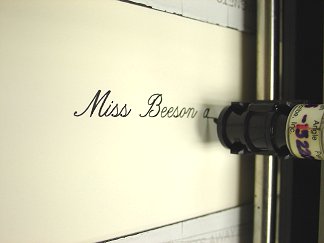
REAVES ENGRAVING- THEY USE A MOTORIZED ARM WITH A QUILL

1.00

cherryj24 Posted:

Re: Computer Calligraphy

Wow thank you. Reaves $1 is for inner AND outer?

evnme Posted:

Re: Computer Calligraphy

hi,
we used follow your heart (liw vendor) for our computer calligraphy. she charges $1 per pair of envelopes (inner and outer).

the colors do not have to be the same, it's up to u....
May2004 Posted:

Re: Computer Calligraphy


Posted by cherryj24

If my invites and returns are printed in burgundy the addresses should match right? Do they have to?


I would.
KandE917 Posted:

Re: Computer Calligraphy


Posted by Preshy7

REAVES ENGRAVING- THEY USE A MOTORIZED ARM WITH A QUILL

1.00


My friend used Reaves for her invites and calligraphy on envelopes...invites were gorgeous but I HATED the calligraphy on the envelopes...I heard a lot of people saying it too. The ink ran a little...it was a mess. i never had the heart to tell her. The writing was just too big or something - it looked funny. Matched the font on the invite exactly but was just weird - can't explain it. It looked exactly like the pic you posted...but like I said the ink ran a bit.
klslk Posted:

Re: Computer Calligraphy


Posted by May2004

I did my own.

I downloaded a font and printed out my envelopes myself.


Me too... no issues.. !
Nadia Posted:

Re: Computer Calligraphy

laura from La productions...
it's only $1 for outer and inner envelopes
sparklehorse Posted:

Re: Computer Calligraphy

i'm having my down free by Bloomingdales... it comes with the package... and their prices are better than I've seen

kmkelly Posted:

Re: Computer Calligraphy


Posted by Nadia

laura from La productions...
it's only $1 for outer and inner envelopes


I'm using Laura too.
lmavolio Posted:

Re: Computer Calligraphy

I found a really inexpensive and reliable place that does envelope printing - they do the outer envelope for 39 cents - if you need the inner envelope, they will do it for 29 cents. My invitation place will likely print the inner envelope for me though - $12.00 for 100!! The place I am using for my printing is called Inkspun.com - they are in Larchmont, NY. You mail them your envelopes and send them an e-mail with an MS Word file of addresses and they do it in a week or less. Very reliable....

www.inkspun.com

Reply to this topic

Log in to reply or quote a post.