Post New Topic

Photoshop CS3

Original post by Espo22

I LOOOVE this program, i recommend it. On adobe.com you can dl the 30 day free trial...I use to have CS2 and its not an easy program, theres IT people who have to take classes for a year to fully understand it, but you can get the basic things and it has alot of cool features. Theres also online tutorials for anyone wanting to do harder things

Espo22 Posted:

Re: Photoshop CS3


Posted by davenjess


Posted by Espo22

ahhh why didnt it come out its a small pic

the before is the bottom pic


If i'm being completely honest - it looks like scratches instead of rain...but either way - it's a pretty cool effect!!


i know thats what i was thinking...i followed their steps and the levels they were using bc i said ok in the end it will come out fine, when i was doing certain things it would say to make the pixels 2.0 but i was like hmmmm it looks better when its at a different number, then i had to use a scale and again it said to move the scale completely in the middle which i thought made it look weird. I should've just stuck with the numbers i thought looked good not the ones they give you,maybe for the pic they used it was better
Espo22 Posted:

Re: Photoshop CS3

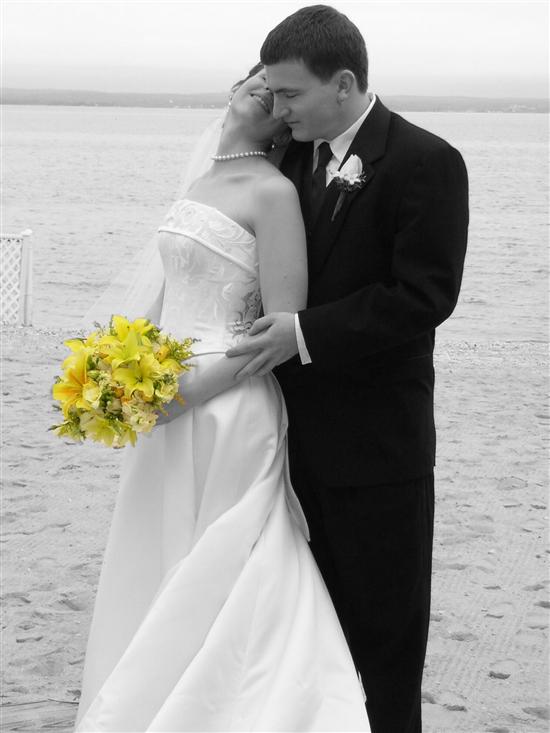
Hey jess maybe you can help me out with one thing i want to do...I want to make a picture black and white but add color just to a few things

davenjess Posted:

Re: Photoshop CS3


Posted by Espo22

Hey jess maybe you can help me out with one thing i want to do...I want to make a picture black and white but add color just to a few things


That is in the layers as well.... There are a few ways to do it.... Let me try and think of the easiest...

Probably:

Create a duplicate layer.

In that secondary layer - do the Magic Extractor & select the points you want to STAY & leave them in color.

In that first layer - make it all black and white.

Use the merge tool & both layers will show - the color one should appear on top of the secondary one. I did this once before...let me see if i can find it...

This I just did now - VERY quick & sloppy....but to give you an idea... (this is my brother & his wife).
ChristineAaron08 Posted:

Re: Photoshop CS3

oohh- cool. I think i will download it for my table #s. i like the b/w and color effect. Thanks for the tip.

I have used it on my old computer like 4 years ago to draw, but not edit photos.

I know kinkos used to have it where you could pay to use their computers.

Is there an option to shave off half my a$$ in a pic so i look thinner...lol If so- it may be worth the $700 of whatever the he!! it costs- haha
davenjess Posted:

Re: Photoshop CS3


Posted by ChristineAaron08

oohh- cool. I think i will download it for my table #s. i like the b/w and color effect. Thanks for the tip.

I have used it on my old computer like 4 years ago to draw, but not edit photos.

I know kinkos used to have it where you could pay to use their computers.

Is there an option to shave off half my a$$ in a pic so i look thinner...lol If so- it may be worth the $700 of whatever the he!! it costs- haha


I have TRIED to remove my double chin to no avail...believe me!!!!!

Elements has a special tool for black & white - you can add a reddish tone, blueish tone, etc. I swear by this program!! I NEVER used to like pics of me - but now that i can get rid of the crap I hate...i don't mind the pics as much...
ChristineAaron08 Posted:

Re: Photoshop CS3

I may have to invest in the chearper version. I want to take our e-pics (efter much editing im sure) and make them a sepia or b/w tone to table #s. The blue tone sounds cool though b/c our color is tiffany blue.

Thanks!

I think we need to create a program that allows us to shave off lbs- we could be millionaires..lol
davenjess Posted:

Re: Photoshop CS3


Posted by ChristineAaron08

I may have to invest in the chearper version. I want to take our e-pics (efter much editing im sure) and make them a sepia or b/w tone to table #s. The blue tone sounds cool though b/c our color is tiffany blue.

Thanks!

I think we need to create a program that allows us to shave off lbs- we could be millionaires..lol


TOTALLY!!!!

Definitely get the Digital Elements..its wonderful! You can also make it black & white & then add a colored filter effect... There are all kinds of fun things to do...
Espo22 Posted:

Re: Photoshop CS3


Posted by davenjess


Posted by Espo22

Hey jess maybe you can help me out with one thing i want to do...I want to make a picture black and white but add color just to a few things


That is in the layers as well.... There are a few ways to do it.... Let me try and think of the easiest...

Probably:

Create a duplicate layer.

In that secondary layer - do the Magic Extractor & select the points you want to STAY & leave them in color.

In that first layer - make it all black and white.

Use the merge tool & both layers will show - the color one should appear on top of the secondary one. I did this once before...let me see if i can find it...

This I just did now - VERY quick & sloppy....but to give you an idea... (this is my brother & his wife).


thank you so much I am gonna try it, im finishing up something im doing now
nifheim Posted:

Re: Photoshop CS3

I am just upgrading to CS3 at work so I will be taking tutorials and even seminars on it. I work in CS2 daily doing photo retouching. It is a art to do it so that it is not fake looking.

CS3 is more user friendly to people who have never taken a class because Adobe is trying to sell packages to everyone and not just designers. Which is good for us designers since they will have to start lower prices since they want to attract more DYI people.

Double chins are hard to completely remove with out knowing layers, opacities, cloning tools and layer controls as second nature. I can remove my chin but not make it look 100% natural so typically when its a important picture shot at a bad angle I just take it so it is not so in your face. Usually take a second layer and 'paint' over it to make it lighter or darker depending on the actual shot.

I have to start working more in elements but typically if your not a pro photographer you never had to touch this but now more and more graphic designers are having to do multi task as digi photographers and web designers so I guess I will be using it more.
davenjess Posted:

Re: Photoshop CS3


Posted by nifheim

I am just upgrading to CS3 at work so I will be taking tutorials and even seminars on it. I work in CS2 daily doing photo retouching. It is a art to do it so that it is not fake looking.

CS3 is more user friendly to people who have never taken a class because Adobe is trying to sell packages to everyone and not just designers. Which is good for us designers since they will have to start lower prices since they want to attract more DYI people.

Double chins are hard to completely remove with out knowing layers, opacities, cloning tools and layer controls as second nature. I can remove my chin but not make it look 100% natural so typically when its a important picture shot at a bad angle I just take it so it is not so in your face. Usually take a second layer and 'paint' over it to make it lighter or darker depending on the actual shot.

I have to start working more in elements but typically if your not a pro photographer you never had to touch this but now more and more graphic designers are having to do multi task as digi photographers and web designers so I guess I will be using it more.


I'm trying to be a photographer...so i'm using the heck out of elements! I did my best friends' day after wedding shots. We went to the college where she and her hubby went and we did pics of them in their wedding attire - her dress & his tux... It was wonderful & the way those pics came out was the catalyst for me wanting to do this...
nifheim Posted:

Re: Photoshop CS3

my cousin designer a program similar to elements that is called bibble. I have used that but honestly I am use to doing things in photoshop and having more control and not using defaults such as the 'auto adjust levels,etc) since they typically ruin your photos in the end. But both programs I do enjoy using for organizing your photographs. This is something I have to start using instead of self organizing myself the program does it for you.

jgl Posted:

Re: Photoshop CS3

thats great! i have the whole CS2 suite and have yet to open it - ive had it a year!
Sue and Danny Posted:

Re: Photoshop CS3

this is sooo cool im gunna download it now

Sue and Danny Posted:

Re: Photoshop CS3

its soo expensive

Creative Suite 3 Design Premium
Buy US$1,799
Upgrade from US$599
Get the trial
jgl Posted:

Re: Photoshop CS3


Posted by Sue and Danny

its soo expensive

Creative Suite 3 Design Premium
Buy US$1,799
Upgrade from US$599
Get the trial


you get a discount if you are a teacher or if a teacher orders it for you

I got CS2 for like $350 something like that
Sue and Danny Posted:

Re: Photoshop CS3

wow reallly thats a good price

Espo22 Posted:

Re: Photoshop CS3


Posted by Sue and Danny

its soo expensive

Creative Suite 3 Design Premium
Buy US$1,799
Upgrade from US$599
Get the trial


I dl'ed the free trial, you can do that for now


Espo22 Posted:

Re: Photoshop CS3

i might dl elements now too, theres no magic extractor on CS3 so imnot sure how to do the black and white with certain things still in color
davenjess Posted:

Re: Photoshop CS3


Posted by Espo22

i might dl elements now too, theres no magic extractor on CS3 so imnot sure how to do the black and white with certain things still in color


SHOOT - there has to be a way to do it....magical selection tool maybe...something along those lines???
NYMetsBride Posted:

Re: Photoshop CS3

Thats sooooo cool!!

Reply to this topic

Log in to reply or quote a post.