Repost: HELP PLEASE! DIY Laser Printing on Envelopes
CC11208
Posted:
Member since
Repost: HELP PLEASE! DIY Laser Printing on Envelopes
This is a repost from BHB......
Any computer/printer wizards on LIW tonight?
I'm great with layout and graphic design, just can't get my envelopes to print without problems!
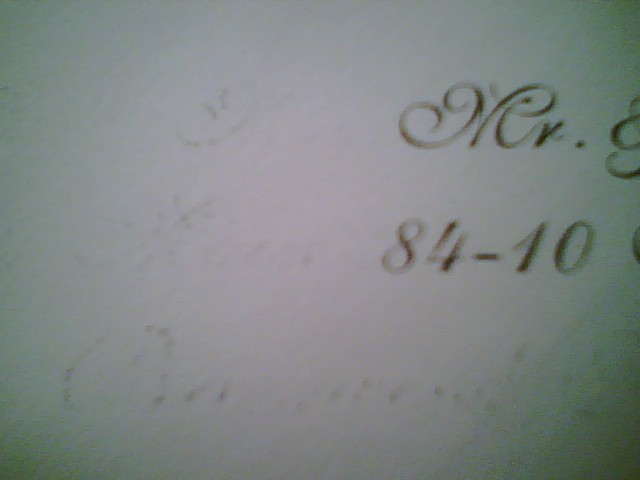
I'm using the MS Word Envelope Wizard and I've been able to print on plain letter-sized envelopes ok, but when I put in our outer envelopes, there's a faint 'imprint' smudging of the address text on the left side of the address. In other words, it looks like this:
Mr. Mr. & Mrs. Xxxxxxx Str Street Address Line 1 City City, State, Zip Code
I hope this makes sense..... the letters on the far left are faint, but make the envelope look dirty, and you can make out the letter shapes. Then the name & address on the right are sort of smudged, not outward from the letter outlines, but as if some of the ink had been lifted off of each letter. The envelopes are plain and smooth, not textured, so I don't know why this is happening.
If it weren't for this faint imprint, the envelope would be perfect. I doubt it's the envelope's thickness, because I printed an inner envelope with the same exact thickness and it prints perfectly.... in fact, I was proud that I got this to work so far!
I'm using a Mac Powerbook G4, MS Word, and an HP Color LaserJet 2605dn. I'm feeding each envelope into the printer one-by-one through the paperfeed in the front of the printer (Tray 1).
Anybody have this problem? Any ideas on how to fix it?