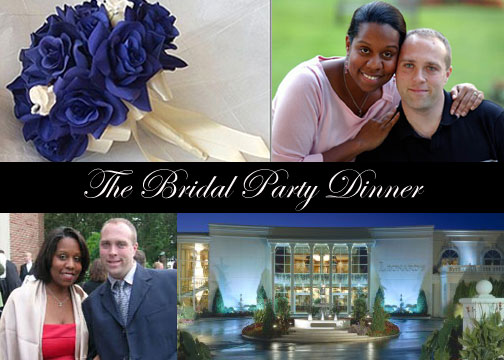
This is the front. The back will have the actual info.
I am so damn excited that I could make something like this.
gNi1125
Posted:
Member since
Re: You guys inspired me...Look at what I made!!
wow they both look amazing!
akaMrsT
Posted:
Member since
Re: You guys inspired me...Look at what I made!!
They look great. Are you printing them yourself?
1017Bride
Posted:
Member since
Re: You guys inspired me...Look at what I made!!
Awesome! Great invite! I love the flowers too!
as1inmay
Posted:
Member since
Re: You guys inspired me...Look at what I made!!
wow that looks great how did u do that?
CubanBride
Posted:
Member since
Re: You guys inspired me...Look at what I made!!
Posted by kdrainey
They look great. Are you printing them yourself?
I tried but I think something is wrong with my printer. The bottom of al my prints are faded. Very weird.
Its in 5 x 7 size so I will probably just take them someone to be printed.
CubanBride
Posted:
Member since
Re: You guys inspired me...Look at what I made!!
In response to the FM's, here is how I did the invitation:
In Photoshop I clicked on FILE, then NEW. I made sure the width size was 7.00 and the height 5.00. Under CONTENTS I clicked on BACKGROUND COLOR, then OK.
That will create a 5 x 7 black background.
Then I decided how much room I would need have to a nice size lettering and that measurement was 3/4 OF AN INCH.
I opened and cropped four photos to the size I wanted. I then clicked SELECT, then ALL. Go to EDIT, COPY. Click on the new background and clict EDIT, then PASTE.
I then went to EDIT, FREE TRANSFORM. This allowed me to move the photos into place, making sure that about 3/4 of an inch of black space was left in the middle. You will have to do that by eye and you may have to do it more than once to get the size right.
After I arranged all the photos into place, I saved the new photo. Then I clicked on the text icon (it is a capital T on the toolbar). In a size 45 Edwardian Script font I typed what I wanted, then clicked EDIT, FREE TRANSFORM to move the text into the middle of the black space. Then I saved the photo again.
That's pretty much it.
eogara
Posted:
Member since
Re: You guys inspired me...Look at what I made!!
Great job!!
CubanBride
Posted:
Member since
Re: You guys inspired me...Look at what I made!!
Thanks!
MCDO15
Posted:
Member since
Re: You guys inspired me...Look at what I made!!
Microsoft Publisher works great for this type of picture montage also
Thumballina
Posted:
Member since
Re: You guys inspired me...Look at what I made!!
That came our so nice...
wood2be
Posted:
Member since
Re: You guys inspired me...Look at what I made!!
Great Job!
bluesashbride
Posted:
Member since
Re: You guys inspired me...Look at what I made!!
that looks very professional! well done!
May152005
Posted:
Member since
Re: You guys inspired me...Look at what I made!!
Those look great!
litlone555
Posted:
Member since
Re: You guys inspired me...Look at what I made!!
Those are great! How do you do that? Is it a program that you buy?
B2BMay04
Posted:
Member since
Re: You guys inspired me...Look at what I made!!
Nice Job
LuckyMe
Posted:
Member since
Re: You guys inspired me...Look at what I made!!
very creative. Pretty.
L*A*adore
Posted:
Member since
Re: You guys inspired me...Look at what I made!!
me likey! very creative!
Dama88
Posted:
Member since
Re: You guys inspired me...Look at what I made!!
That is absolutely beautiful Very elegantly done!! Pat yourself on the back, you did a great job.
cmastro25
Posted:
Member since
Re: You guys inspired me...Look at what I made!!
Truly gorgeous! Great Job!
BethGail
Posted:
Member since
Re: You guys inspired me...Look at what I made!!
greta job and thanks for hte instructions. I have PS beacuse of work ( i work with but am not a graphic designer)but i am not so great at creating composites in it