


Wedding Forums > Brides Helping Brides ™ > DIY Table Numbers - first draft with PICS - UPDATED directions on page 2
DIY Table Numbers - first draft with PICS - UPDATED directions on page 2
Lools
Posted: May 22, 2007 02:01 PM+

Posted: May 22, 2007 02:01 PM

Re: DIY Table Numbers - first draft with PICS
OMG those are awesome! We were planning of doing pictures of ourselves in various locations for our table numbers, but couldn't figure out exactly how!! This is a great idea! How did you do that???
acsm
Posted: May 22, 2007 02:03 PM+
Re: DIY Table Numbers - first draft with PICS
very nice.. can i send you my pictures ?? just kididng
i like the color ones better too..
JennysMOH
Posted: May 22, 2007 02:05 PM+
Posted: May 22, 2007 02:05 PM
Re: DIY Table Numbers - first draft with PICS
Wow!!! Those are truly beautiful. You are so creative and artistic.
MattandTricia07
Posted: May 22, 2007 02:12 PM+
Posted: May 22, 2007 02:12 PM
Re: DIY Table Numbers - first draft with PICS
You are so talented girl!! You should become a LIW vendor!!!!
leena07
Posted: May 22, 2007 02:23 PM+
Posted: May 22, 2007 02:23 PM
Re: DIY Table Numbers - first draft with PICS
beautiful!
dancerandchef
Posted: May 22, 2007 02:23 PM+
Posted: May 22, 2007 02:23 PM
Re: DIY Table Numbers - first draft with PICS
Posted by MrsQ-in2007
Someone on BHB asked to see everyone's table numbers and I posted my rough drafts on there. Here are a few of them for all you lovely '07ers to see...
Any suggestions on improvements????? They will all be 5x7 in size. The original plan was to put them in frames, but I MIGHT do something else, not sure. Opinions and suggestions welcome!
*Note: they all say 'Table 1' right now because I haven't decided the order etc. That will be fixed later.
ETA: here's a collage of the four examples - may be easier to see:



FYI: I made the epics lighter (almost like watermarks) so that the 'Table #' would be more visible.
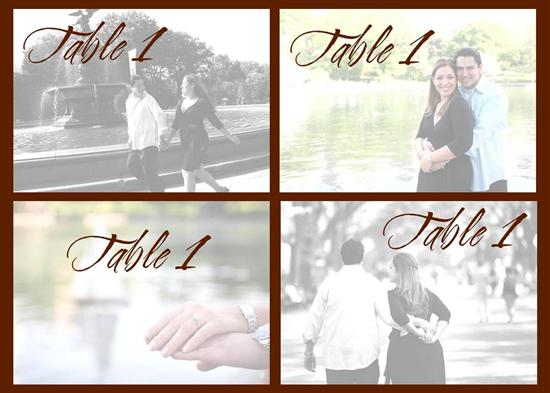
I love them. They are so nice. How did you make them. You could use a different photo for each table. That is beautiful.
~dancer and chef~
danielle19755
Posted: May 22, 2007 02:25 PM+
Posted: May 22, 2007 02:25 PM
Re: DIY Table Numbers - first draft with PICS
wow!!! I love them... How did u make the pics lighter? what kind of paper will u be using?
enjft
Posted: May 22, 2007 02:40 PM+
Posted: May 22, 2007 02:40 PM
Re: DIY Table Numbers - first draft with PICS
You def deserve the DIY sheild. Everything you are doing looks awesome!
aimes1313
Posted: May 22, 2007 02:45 PM+
Posted: May 22, 2007 02:45 PM
Re: DIY Table Numbers - first draft with PICS
Those look really nice. Good job.
RGV07
Posted: May 22, 2007 02:56 PM+
Posted: May 22, 2007 02:56 PM
Re: DIY Table Numbers - first draft with PICS
wow, ur are crafty there. amazing!!!!!
MrsQ-in2007
Posted: May 22, 2007 03:44 PM+
Posted: May 22, 2007 03:44 PM
Re: DIY Table Numbers - first draft with PICS
Thanks everyone!!!! I am definitely using a different picture for each table. Just have to narrow it down to 12!I am using another 4 (different) vertical pictures for my photocube, and will also put a couple of my epics in my program... I mean, if I don't use them on the wedding day, what else will I do with them but put them away! lol.
For those of you who asked how I did it, here's my semi-complicated way... for those graphics experts out there, maybe you can suggest an easier way???
Ok, I opened Powerpoint.
- New document
- File, Page Setup
- Changed the page size to 20 x 28 inches (**this is 4 times the 5x7 size they will actually be printed as - this is so that the quality remains as high as possible when I save it as a jpg file**)
- Click OK
- Then Insert Image you want to use
- Double click image (brings up Format Picture window)
- In the 'Size' tab, changed the height to 20 inches
*VERY IMPORTANT: Make sure the 'Lock Aspect Ratio' box IS CHECKED*
- Now the picture fits perfectly up and down, but may be too big horizontally.
- Crop the left or right (or both) side until it's 28 inches.
- Now the image is the same size as your Page Setup.
To make the image lighter:
- Double click image
(Format Picture window opens)
- In the 'Picture' tab, click on the arrow for 'Color'
- Choose 'Washout'
- Click OK
- IF the image is too light, go back into Format Picture and INCREASE the Contrast by 10 and DECREASE the brightness by 10.
To add text:
- Insert WordArt
- Play with fonts, colors, and size to achieve the look you want for the wording.
ETA: Previously forgot to add the last step, sorry!
How to save the file as a picture.
When you are done with making the file (and as you are working on it), save your file.
Once you're finished and happy with the way the picture looks, you need to save it as a jpg file. To do this, go to File, Save As, and in the 'File Type' change it to 'JPG' and save it again as a jpg. It's going to ask you to save all slides or just the current slide - if you click to save all files, it will save each slide that you have in the file as a jpg - each file will be automatically saved in a new folder.
So now you have the files saved as individual jpg files. What I plan to do is to upload the jpg files to Kodak Gallery or Shutterfly and to order 5x7 prints of each - that way I'll have actual pictures and don't have to worry about buying photopaper and printing them myself. But I'm sure you could do that if you want.
HTH!!!
Lools
Posted: May 22, 2007 04:27 PM+
Posted: May 22, 2007 04:27 PM
Re: DIY Table Numbers - first draft with PICS
WOOO HOOO!!! Thanks so much for the directions!!
I'll have to get FH on this! He's used to Powerpoint!
HOORAY!!!

JennysMOH
Posted: May 22, 2007 04:42 PM+
Posted: May 22, 2007 04:42 PM
Re: DIY Table Numbers - first draft with PICS
THANK YOU FOR THE DIRECTIONS!!!!!!!!!!!!!!!!!!!
olechka1911
Posted: May 22, 2007 05:29 PM+
Posted: May 22, 2007 05:29 PM
Re: DIY Table Numbers - first draft with PICS
Yesenia,You are the Queen of DIY's
If it were up to me, I would give DIY crown to you to wear FOREVER Thanks for the instructions
CrazyLove
Posted: May 22, 2007 05:38 PM+
Posted: May 22, 2007 05:38 PM
Re: DIY Table Numbers - first draft with PICS
Thats exactly what we wanted to do once we take our pics
rfilipofornow
Posted: May 22, 2007 07:10 PM+
Posted: May 22, 2007 07:10 PM
Re: DIY Table Numbers - first draft with PICS
those are lovely!
westhamptonwedding
Posted: May 22, 2007 07:11 PM+
Posted: May 22, 2007 07:11 PM
Re: DIY Table Numbers - first draft with PICS
Super cute!
ErinC0119
Posted: May 22, 2007 07:22 PM+
Posted: May 22, 2007 07:22 PM
Re: DIY Table Numbers - first draft with PICS
Love them!!! So creative!!!
billandme
Posted: May 22, 2007 07:36 PM+
Posted: May 22, 2007 07:36 PM
Re: DIY Table Numbers - first draft with PICS
They look amazing!!!!!!!!!!!!!!!!!!!
AlmostKulak
Posted: May 22, 2007 07:43 PM+
Posted: May 22, 2007 07:43 PM
Re: DIY Table Numbers - first draft with PICS
They look awesome, you can do anything!! 






Welcome New Vendors
- The Barn At Old Bethpage Discover the charm a...
- Tellers: An American Chophouse Celebrate Your Love ...
- Cup Of Tea Creative Unique Wedding Gifts...

- Speeches for Milestones The Big Day Has Arri...

- Long Island Bridal Expo Connecting Brides & ...

- 1 More Rep 1 More Rep: Elite Fi...

- Bellport Inn The Bellport Inn –...
- Fiddlers Dream Music Experience the Music...

- Havana Central Celebrate Your Weddi...
- Primerica Nelida Flynn Primerica Nelida Fly...

- Acetra Affairs Here at Acetra Affai...

- The Crushed Olive Discover Culinary Ex...